Context is everything
A structured AI design workflow built on one rule: keep context small and modular. MEMORY.md, per-component skill files, and Figma Console MCP combine so Claude can research, explore, and import production-ready components in one session.
TL;DR
A structured AI design workflow built on one rule: keep context small and modular. A MEMORY.md navigation map, per-component skill files Claude loads on demand, and Figma Console MCP for live DS access. Three phases per session: research with Mobbin MCP, HTML exploration, Figma import. 80% production-ready output, consistently.
The problem
The first time I seriously tried using Claude in my design workflow, it hallucinated. Consistently. It invented component names, ignored documented spacing tokens, and made up variants. I spent more time correcting the output than designing.
The problem was the approach, not the tool. I was front-loading everything: paste in the design system, describe what I needed, wait for a result. That fails for a 200-component DS. Too much context and the model stops reading carefully, filling gaps with plausible-sounding nonsense.
The fix was architectural, not a better prompt. Keep context small. Keep it modular. Load only what is needed, when it is needed. Every part of this workflow follows from that one rule.
The workflow
Three phases, in order. Research informs direction. Exploration generates options. Import converts decisions into DS-compliant components.
Research
Before touching Figma, Claude researches the pattern using Mobbin MCP. The output is a structured brief: what others are doing, what they are not doing and why, where there is room to do something different. That brief drives everything after.

Exploration
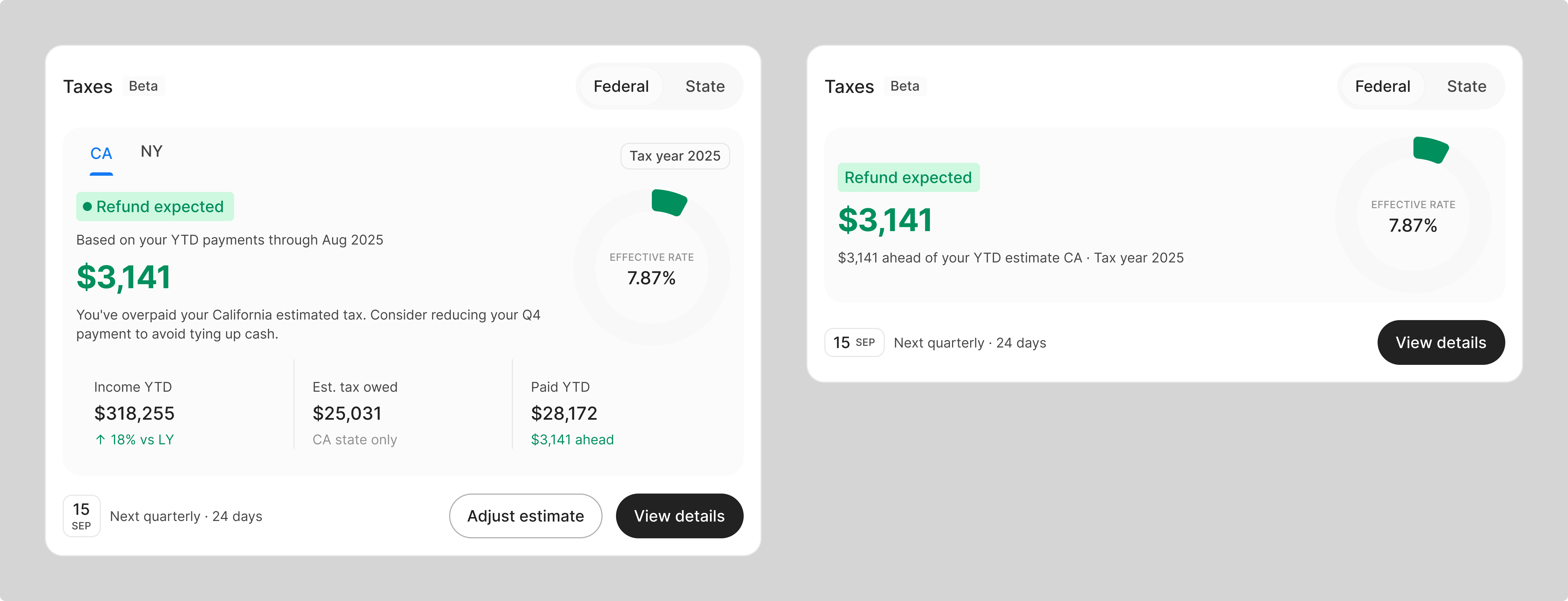
With a research brief, Claude generates an HTML prototype using DS tokens as CSS variables. Browser-rendered, not wireframes, not Figma. Something we can look at and discuss in the same session. Variations get generated for the parts that need more options. The donut chart inside the tax widget went through 10 versions before locking in one.
Import to Figma
Once the direction is confirmed, Claude imports to Figma. It reads MEMORY.md for the component map, identifies which components the design needs, loads the relevant skill files, and instantiates them with the correct tokens and properties. 80% production-ready in one go. Design judgment handles the remaining 20%.
The architecture
Three components make reliable output possible. Each required upfront structure work before any design session could benefit.
MEMORY.md: navigation map
One file that tells Claude where everything lives in the Figma DS: component locations, primitive names, radius scale, typography tokens. It loads at the start of every session. It does not contain the specs, it points to where they are. Navigation without bloat. Detailed data lives at the component level, one .md file per family.
Skill files: component bibles, loaded on demand
Each component family gets a structured .md file: anatomy, token map per state, when to use it, when not to, known issues. Claude loads a skill file only when it identifies it needs that component. That selective loading keeps the active context small and hallucination risk low. A session designing a tax widget loads TextField, Button, and the relevant chart components. Not all 200.
Component bibles — click to read
Figma Console MCP: direct DS access
A third-party plugin built on Figma MCP. Claude can read the live Figma file, browse component nodes by ID, verify token bindings, and instantiate components with the correct variant properties. The output is the component placed in Figma with the right tokens applied, not a handoff document.
southleft/figma-console-mcp80%
Production-ready per session
6
Skill files (component bibles)
3
Phases per session
1 Designer
Team
Results
The workflow reliably gets to 80% production-ready. The remaining 20% is design judgment: spacing refinements, edge cases, calls the AI should not be making. That ratio has held across sessions. 80% from a structured workflow beats 60% from an unstructured one, and the designer still owns the last mile.
Reflection
Three things worth being honest about.
The setup cost is real
Writing component bibles for a 200-component DS takes weeks. The workflow only works because the architecture was built first: skill files, memory map, MCP tuning. Trying to skip this and prompt better reproduces the original hallucination problem.
80% is the ceiling, not a failure
The workflow reliably hits 80% production-ready. It never hits 100%. AI handles the reproducible parts: component instantiation, token binding, layout assembly. Design judgment handles the rest. Expecting AI to make final design calls is where the trouble starts.
Modular context is a principle
Every improvement to this workflow came from the same rule: make context smaller and more targeted. The MEMORY.md, the skill files, selective loading are not Claude-specific tricks. They are good information architecture, applicable to any system that processes context.
This does not always run smoothly. Skill files need maintenance as the DS evolves. The memory map drifts. Some sessions work better than others. But designing with an AI that has no structured knowledge of your system does not scale past a prototype.
Role
Product Designer
Timeline
Ongoing
Platform
Figma, Claude Code, Browser
Team
Deliverables
Next Project